
Modern smartphones collect far more than most owners realize, and much of it is optional. Location history, advertising identifiers, background radio scans and automatic usage reports are all governed by switches sitting in plain sight inside the settings app. Here are ten phone settings that quietly feed the tracking economy, and what actually changes when each one is turned off.
1. Location services: The Master Switch

Location services sits upstream of nearly every other tracker on a handset. Once an app holds the permission it can log coordinates while running in the background, and the device itself can be placed by satellites, cell towers and nearby wireless networks, the layered methods cataloged under mobile phone tracking. Revoking the grant app by app, rather than only at the system level, is what ends the quiet logging.
Switching it off does not make a handset invisible. A carrier still knows which towers a phone is talking to, and no settings menu controls that. What changes is how many private companies hold a continuous, precise trail.
2. Advertising identifier: One Number Ties It Together

Every mobile platform issues a resettable string that lets ad networks recognize the same device across unrelated apps without using a name. That single value, the advertising identifier, is what allows a shopping app, a game and a weather app to be stitched into one profile, and it is designed so the owner can reset or clear it at will.
Resetting breaks the historical link; switching it off entirely leaves apps without a shared handle to join on. Ads keep arriving either way, but they are matched to context rather than to a device’s accumulated history.
3. Bluetooth: A Radio That Announces Itself

Discovery under the Bluetooth standard works by having a device announce itself to anything listening within short range, roughly ten meters for a typical phone class. Proximity beacons installed in shops and venues rely on that same behavior, noticing a passing handset without pairing, a prompt or any visible sign on screen.
Leaving the radio off between uses removes a phone from those scans entirely. The cost is real, since headphones, watches and car audio all depend on it, so the workable compromise is enabling it for a session instead of leaving it live all day.
4. Wi-Fi scanning: Off Is Not Always Off

A phone hunting for networks does not wait to be asked. It calls out repeatedly to see what is in range, and every one of those scans exposes the handset to nearby access points. Because network names map to fixed addresses, the Wi-Fi standard ends up underpinning location positioning as much as connectivity.
Android keeps a separate scanning toggle tucked under location settings that continues improving accuracy even when the main Wi-Fi switch appears off. Turning both off stops the broadcasts, at the price of slower and less accurate location fixes.
5. App permissions: Grant Less Than Requested
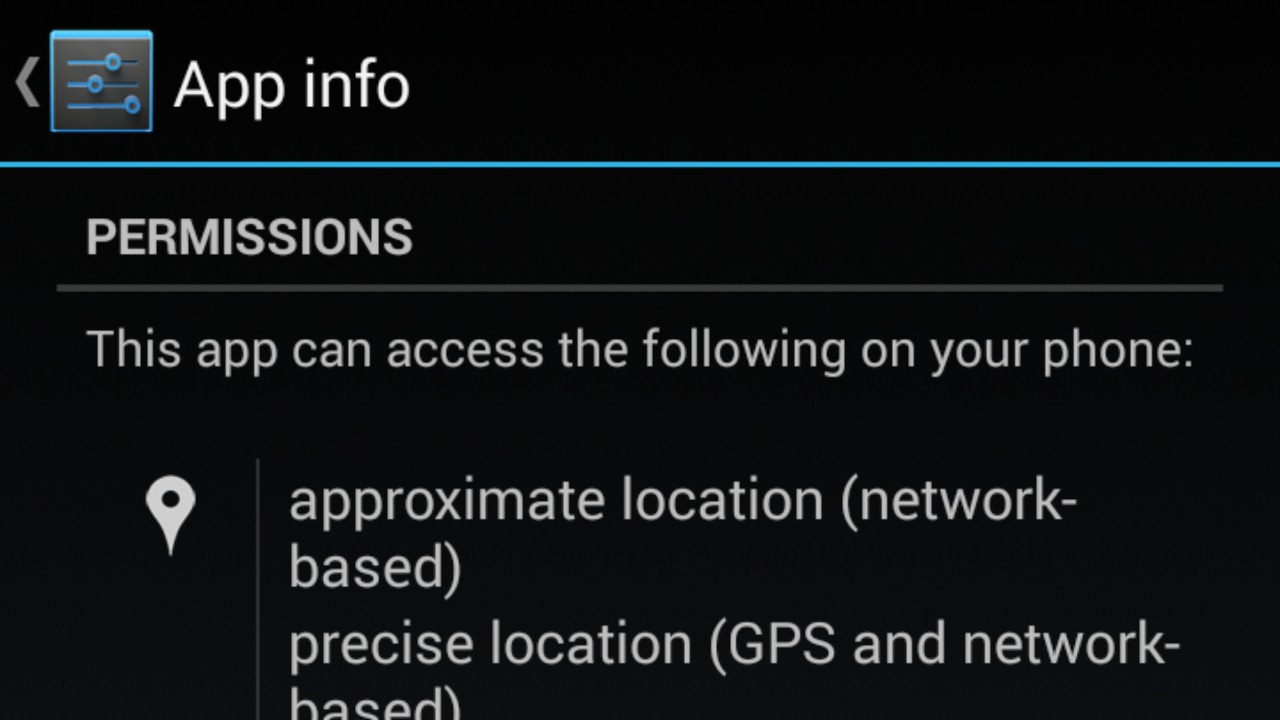
Access on any modern system is policed by a permission model inherited from decades of computing practice, in which a resource is reachable only by a process explicitly granted the right to it. Phones apply that idea per app, so microphone, camera, contacts and photos each sit behind an individual grant, and requests routinely exceed what an app actually needs.
Auditing the list occasionally beats a single purge, because permissions get re-requested after updates and reinstalls. Denying one rarely breaks an app outright; most degrade to a narrower feature set, and a few reveal the access was never needed.
6. Personalized ads: Profiles Built From Behavior

Personalized advertising scores behavior, including pages opened, purchases, searches and time of day, then matches inventory against the resulting profile, the practice described under targeted advertising. The switch buried in a phone’s privacy menu governs whether the platform may use that accumulated history when choosing which ads a device sees.
Turning it off does not reduce how many ads appear, and it does not erase data already collected; it limits how that data is used for selection. Same volume, less inference, a distinction platforms rarely spell out plainly.
7. Cookies: The Web’s Long Memory

Logins persist between visits because a site asks the browser to keep a small browser cookie and hand it back later. Trouble starts with third-party cookies set by embedded advertising code rather than by the page being read, which lets a single network watch one device move across many unrelated sites.
Blocking third-party cookies in the phone’s browser preserves ordinary sign-ins while cutting that cross-site chain. Clearing stored cookies periodically resets whatever profile survived, although signed-in accounts and device fingerprinting keep working without them.
8. Voice assistant: Waiting For A Wake Word

Voice assistants idle by listening locally for a wake word, then stream the audio that follows to remote servers for interpretation, the architecture common to every mainstream virtual assistant. Misfires are the practical privacy problem, because a phrase that merely resembles the trigger can start a recording nobody intended.
Disabling the assistant, or at minimum the always-listening trigger and its lock-screen access, closes that gap while leaving press-to-talk available. Stored voice history sits separately and usually has to be deleted from the account rather than the handset.
9. Precise location: Approximate Is Usually Enough

Handsets can hand an app a fix accurate to a few meters using the satellite constellation behind the Global Positioning System, sharpened further by cell and wireless data. Both major mobile platforms now allow that precision to be downgraded to an approximate area, roughly neighborhood scale, on a per-app basis.
A weather app, a news app or a store locator works perfectly on the coarse version, while turn-by-turn navigation and ride-hailing do not. Setting precision per app instead of globally keeps the useful cases intact and denies everything else a meter-level history.
10. Diagnostic data: The Reports Sent Home

Diagnostic and usage reporting is automated telemetry, measurement gathered on a device and transmitted to a manufacturer or developer without asking each time. Crash logs, feature counts and performance samples all travel under that heading, and phones commonly ship with much of it switched on by default.
The stated purpose is engineering, and the payload is usually not personal content, but the volume and the opt-out-by-menu design are why privacy guides flag it. Switching it off costs an owner nothing functional and removes a standing outbound stream.
More from Morning Overview
- A handful of SUVs keep hitting 300,000 miles, and they share one engine trait
- Supplements now rank as the fifth-leading cause of death from liver disease.
- A study names the one SUV most likely to reach 250,000 miles
- More than 60,000 people flee the Spokane area as complex fires overrun 600 structures
